Bob is on the move!
Oh no! Bob snuck out of his crib and let the chickens out of their cage!His big brother Pepper is always there to look out for him and is ready to find them!
Click here to play
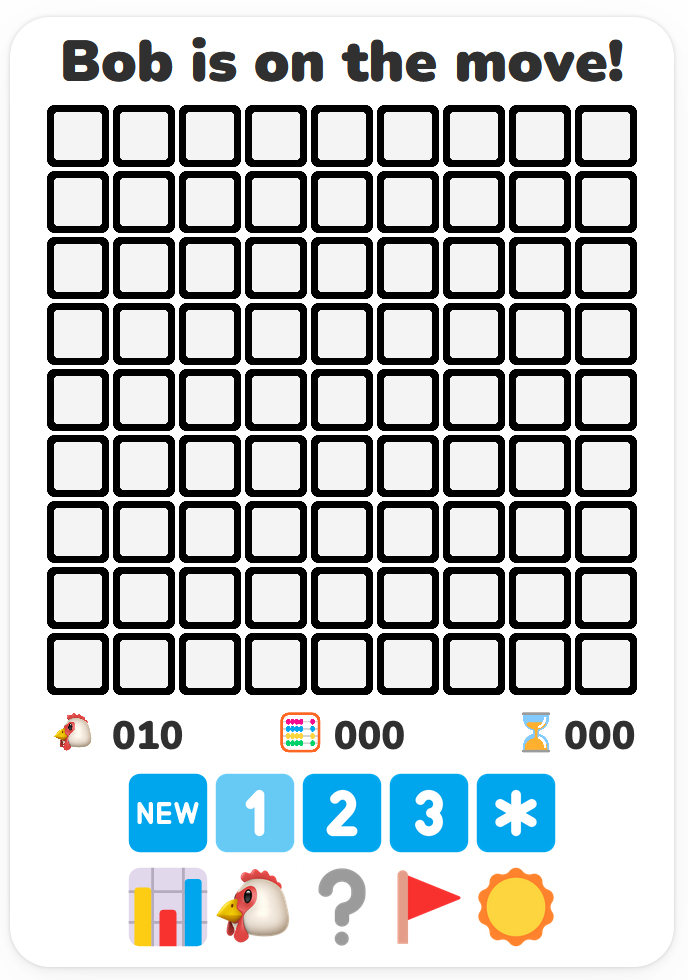
The back yard is a grid of clickable squares, with hidden chickens scattered throughout the board. Empty squares have numbers telling you how many chickens touch the square. If there is no number, the square doesn't touch any chickens. You can use the number clues to solve the game by opening all of the empty squares. If you click on a chicken you scare it away and you lose the game!
You check squares with the left mouse button and can flag potential chickens with the right mouse button.
Above is the user interface of Bob is on the Move! On the top, you can see a grid of squares: the yard. The black square ⬛ means that the square has not been checked yet. Left-click on any square to check it, and start the game. Right below the yard you can find three counters.
On the left you can find the chicken counter 🐔. It shows the number of chickens on the board without flags (we will talk about flagging shortly).
In the middle, next to the abacus 🧮 you can find the moves counter. It keeps track of how many moves you have made since the beginning of each game. By moves we mean all the clicks (left and right) or taps you have made on the board.
Finally, on the right, you can find an ⌛ hourglass and, more importantly, the time counter, keeping track of time: seconds passed since you opened the first square.
Below that are multiple game options. The New icon will allow you to clear the yard and start a new game.
The 1, 2, and 3 icons represent Easy, Medium, and Hard levels. The star icon allows you to design a custom yard.
The Chart icon 📊 will show you a record of all games you have played. The Chicken icon 🐔 will allow you to change the game characters. The Question Mark ❓ will display the rules of the game. The Flag icon 🚩 changes to flag mode (so you can play on mobile) left clicking places flags, and finally, the Sun icon ☀ will change the game to dark mode.